A guided tour through the pieces that make a booth — from the wrapper script on disk to the sidecars beside the container — with the picture for each.
← Back to home
CodingBooth maps the container's user to your host UID and GID, mounts your project
into /home/coder/code, and runs everything as the unprivileged coder user.
Files created inside the booth are owned by you on the host — no root-owned
artifacts, no permission dance.
The booth script you commit to your repo is a small bash wrapper that downloads,
verifies (SHA-256), pins, and executes the platform-specific codingbooth binary.
A shared cache (~/.cache/codingbooth/) keeps versions reusable across projects.
The booth runs as coder with the same UID/GID as your host user, plus passwordless
sudo when you need it. The .booth/ folder is mounted read-only by
default; opt in to writes with --writable-booth, or harden further with the
no-sudo template.
Five built-in variants share one base image: base (ttyd terminal), codeserver (VS Code in the browser), notebook (Jupyter Lab with multi-language kernels), and desktop-xfce / desktop-kde (full Linux desktops via noVNC). Same toolchain underneath — different way to drive it.
Variants guide →
./booth picks the variant from .booth/config.toml, builds (or reuses)
the image, maps your UID/GID, mounts your code, and launches the UI. Use
--daemon for background, -- <cmd> for command passthrough,
or --keep-alive to keep the container after exit.
One CLI, many verbs: run, config, build,
list, start / stop / restart,
shell / exec, example try, template list,
install / update. Most options also live in
config.toml, so the same setup works across machines without re-typing flags.
Every booth ships with a curated baseline: bash/zsh,
git/gh/tig, curl/wget/httpie,
jq/yq/tree, nano/tilde/ranger/less,
plus tini, socat, locales and CA certs. You build on top — not from
scratch.
booth config scaffolds a complete .booth/ from 77+ templates —
languages, IDEs, AI tools, browsers, databases, desktops, education. Browse and pick in the
TUI, or script it with a selection DSL like
go:1.25+linter/python:3.13+uv/claude-code.
The interactive sibling of booth config --no-tui: a multi-tab terminal UI for
browsing templates by category, previewing what will be emitted, and toggling extensions
with auto-select awareness. Round-trips with .booth/ — open it on an existing
project and the current selection is pre-populated.
mkdir my-bun-app && cd my-bun-app.booth config to scaffold a .booth/ interactively.codeserver with → → →.bun, Enter opens its parameter editor
(BUN_VERSION, BUN_PKGS)..booth/ initialized;
Boothfile shows setup bun + setup bun-code-extension.
A declarative, intent-based config that compiles to a standard Dockerfile —
setup, install, run, env, copy,
expose. No more Dockerfile boilerplate, but the generated Dockerfile is always
inspectable.
booth build compiles the Boothfile into a Docker image and (optionally) pushes
it to a registry. The default tag is a content hash of the configuration, so identical
configurations produce identical tags — clean caching, exact reproducibility, and a stable
target for deploy pipelines.
Each *--setup.sh follows a three-artifact pattern: a build-time install, an
on-start startup script, and an on-shell profile script — with
LEVEL ordering (50–79) so language, extension, and tool layers compose in the
right sequence.
Everything CodingBooth needs travels with your repo under .booth/:
config.toml, Boothfile, .env,
setups/, startups/, home/, home-seed/,
cache/. Edit by hand, generate via booth config, or mix the two.
Values you write in .booth/.env, .booth/config.toml, and
CB_* env vars are resolved by booth before docker sees them — a small
bash-like subset: $VAR, ${VAR:-default},
${VAR:?required}, leading ~, and "..." /
'...' quoting. Docker's own --env-file wouldn't normally
expand any of these, so booth parses .booth/.env first and hands docker
a resolved copy.
A per-session ephemeral runtime dir: wiped on start, cleaned on exit. Features like
booth--expose drop their control files here; your startup scripts can use
it too. Visible from the host while the booth is running; --leave-tmp-on-exit
and --keep-tmp-on-start preserve contents for debugging.
Seed the container's home from four layered sources — team defaults / overrides + host
defaults / overrides — with .mount-this markers for fine-grained control.
Make the whole /home/coder persistent with --persist-home (Docker
named volume), and ship it around with home-volume export/import.
.booth/cache/ mirrors the container's filesystem layout — anything you drop
here is auto-bind-mounted at the matching path inside the booth. Perfect for shell
history, tool configs, and AI agent caches that should persist across sessions on this
machine. Gitignored, host-local, safe to delete any time.
Add --persist-home and /home/coder is backed by a Docker named
volume — IDE settings, browser sessions, shell history all survive exit and rebuild. Manage
volumes with home-volume list / export / import to move state between
machines. Experimental.
Treat booths like cattle: list, start, stop,
restart, remove, prune. Add session timers
(--show-count-down) and idle auto-shutdown (--idle-time) so an
abandoned booth doesn't quietly burn resources.
Every variant has its own way to spawn extra terminals (Code Server's integrated terminal,
Notebook's Launcher, a desktop terminal emulator). shell and exec
give the terminal variant the same capability — and work everywhere else
too. No SSH server, no extra ports; both use docker exec under the hood.
Show overlays, prompts, and toasts inside a running booth's web UI — from scripts, CI,
or another shell. Types: yes-no, ok, text,
password, choice, radio, checkbox,
toast. Same overlay renders identically on terminal, Code Server, Notebook,
and the desktop variants.
Started a server on a port that wasn't published at docker run time?
booth--expose opens a TCP tunnel at runtime — no container restart,
no port re-mapping. The host-side booth process picks up the request via a control file in
.booth/.tmp/ and sets up the listener automatically.
--show-run-time displays elapsed session time next to Restart / Shutdown;
--show-count-down arms a wall-clock budget with a live countdown and color
warnings at 15 / 10 / 5 minutes remaining. --count-down-exit-code lets cron,
CI, or a wrapper distinguish a timeout from a clean exit.
--idle-time <s>[,t] arms an in-container watchdog. After s
seconds with no activity it shows a "Still using this booth?" prompt; if no reply within
t seconds the booth shuts itself down. A persistent Idle chip in
the lifecycle panel lets you Pause (time-boxed hold) or
Disable (indefinite) — so a long compile is never mistaken for an
abandoned session.
Wrapped variants (codeserver, notebook, desktop-xfce, desktop-kde) expose two HTTP
endpoints under the reserved /__booth/ namespace.
/__booth/health actively probes the inner service every call — so a hung
code-server can't quietly look healthy. /__booth/info returns container
identity (name, variant, version, port). Both are Cache-Control: no-store.
45+ ready-to-run workspaces: go, python, nodejs,
rust, java, flask, fastapi,
django, nextjs, react, angular,
spring-boot, rails, lamp, lemp,
mern, pern, wordpress — and more. List them with
booth example list; spin one up with booth example try.
The pieces that show up when one container isn't enough.
Need docker, kind, or k3d inside the booth?
--dind spins up a sibling Docker daemon in a sidecar, linked back via labels —
the booth gets a real Docker socket without polluting the host.
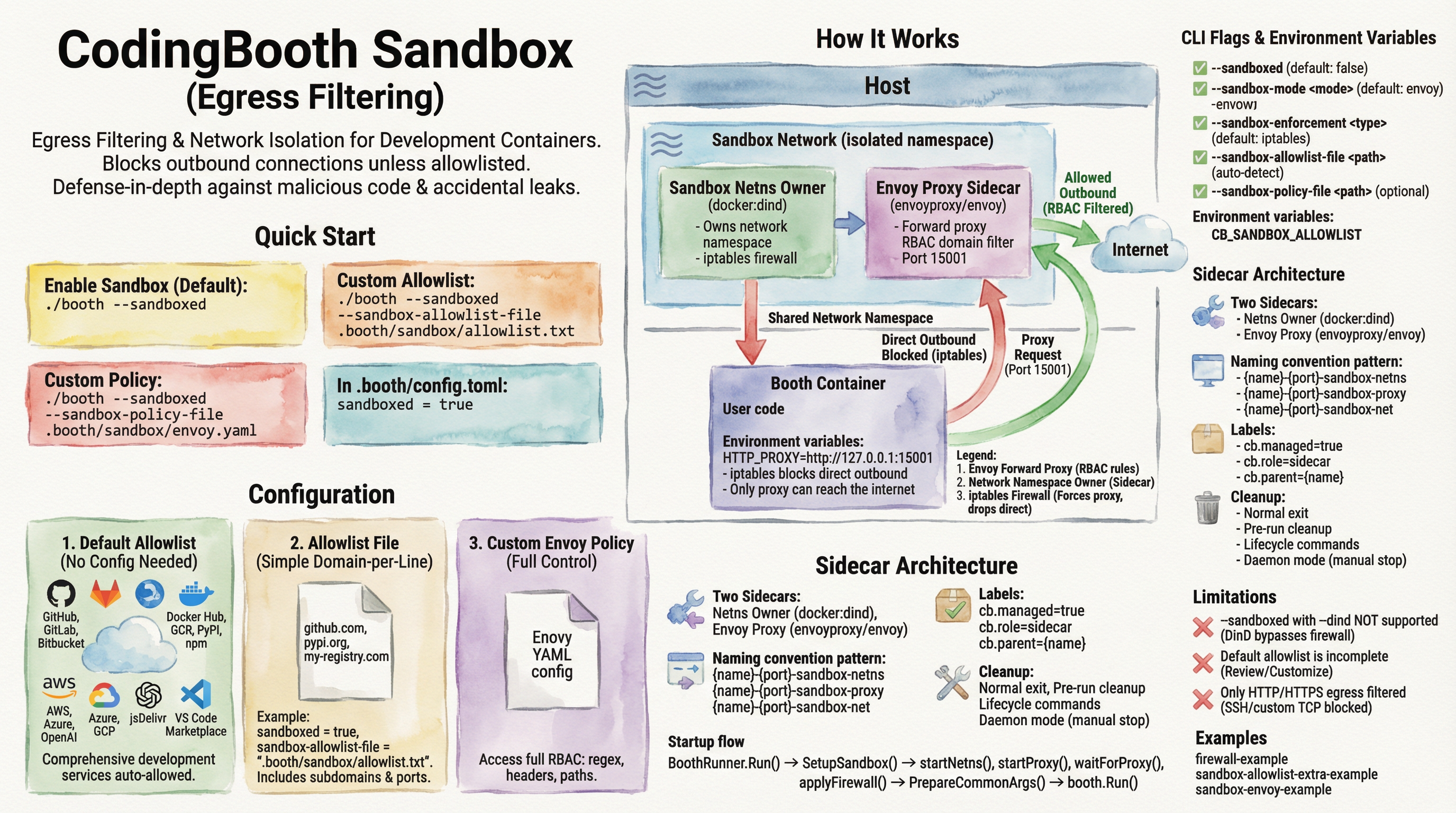
--sandboxed routes the booth's egress through an Envoy proxy with a domain
allowlist, enforced by iptables. Useful when you run third-party AI agents or untrusted
code and want to bound where they can phone home.
Open a booth from inside another booth — useful when an outer environment is your "host"
and you want an inner one for a specific task. CodingBooth detects nesting, warns you on
booth run, and routes Docker through the right daemon.
The desktop variants ship a full Linux desktop (XFCE or
KDE Plasma) accessible from your browser via noVNC — perfect for IDEs that
don't run in a browser (IntelliJ, PyCharm, Eclipse, KiCad). Configure resolution with
GEOMETRY=1920x1080 and pick a resize mode (remote,
scale, off).
Every booth includes /opt/codingbooth/AGENT.md — operational instructions for
in-container AI agents — plus a symlink farm (CLAUDE.md, COPILOT.md,
CURSOR.md, …). Templates exist for Claude Code, Codex, Aider, Cursor, GH
Copilot, Ollama, and friends, so adding an agent is one line in booth config.